5 Hidden Features of the Motorola Razr Ultra 2025 You Must Know About
Category: Mobile Phones
Introduction
The Motorola Razr Ultra 2025 is positioned as one of the most refined clamshell foldables on the market, blending a nostalgic design language with modern hardware and software polish. Beyond the headline specs — folding OLED panels, fast charging, and flagship-class cameras — the Razr Ultra hides several practical features designed to improve daily use, productivity, and longevity. These are often overlooked in initial hands-on impressions but make a measurable difference for buyers who rely on their phones in real-world scenarios.
This article walks through five of those less-visible features, explains how they help in everyday life, and offers practical tips for getting the most out of the Razr Ultra. The analysis also includes a focused review, pros and cons, a comparison table to similar foldable alternatives, and a buying guide for prospective buyers who care about durability, software longevity, and usability on the go.
Detailed Product Review and Analysis
The Motorola Razr Ultra 2025 refines the clamshell format with a focus on the external Quick View display, hinge reliability, and software continuity between folded and unfolded states. On paper, foldables are compelling for those who want a compact device that expands into a larger display when needed. In practice, the Razr Ultra stands out where it matters most: convenience features, photography versatility, and day-to-day ergonomics.
Build and hinge: Motorola’s hinge engineering in this generation emphasizes smooth folding and reduced gaps, which improves both pocketability and screen protection. Hinge sensors do more than manage folding resistance — they inform software behaviors, from adaptive controls to camera stabilization when the device is partially folded.
Displays and multitasking: The main interior panel delivers tablet-like space for two-up multitasking, while the Quick View outer screen supports notifications, media controls, and an expanding set of widgets and shortcuts. What many buyers miss at first glance is how deeply the software integrates hinge angle with app behavior — an area where Motorola put significant effort.
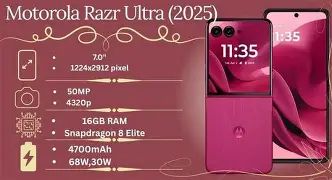
Performance and battery: Hardware choices are aimed at balancing performance with thermals for a thinner folding chassis. Battery life depends on usage patterns — frequent camera use and prolonged high-refresh-rate activities will shorten runtime — but the software offers nuanced power management tools that actively learn the user's routine to extend uptime.
Cameras: The camera array prioritizes flexibility over outright megapixel counts. The real advantage is how the folding form factor pairs with software features to enable hands-free shooting and creative framing, particularly at partial hinge angles where the phone can act like a mini tripod.
Why these hidden features matter to buyers
- Daily reliability: Hinge-aware software and predictive battery management reduce the friction of owning a foldable.
- Productivity: Quick View customization and split-screen continuity make the device more useful for messaging, navigation, and reference work without opening it constantly.
- Photography utility: Hands-free and hinge-stabilized capture modes enable shots that are hard to achieve with rigid phones.
- Longevity: Adaptive thermal and firmware-focused updates can extend practical ownership, a major concern for buyers paying flagship prices.
5 Hidden Features — What They Are and How to Use Them
1. Expanded Quick View: Third-party widgets and multi-app stacks
Beyond quick notifications and simple controls, the Razr Ultra’s Quick View external display supports a customizable stack of widgets that can include third-party services. This turns the outer screen into a persistent glance surface for calendar items, music controls, transit updates, and lightweight messaging previews.
Real-world use case: commuters and coffee-table use. When hands are full or the phone rests on a table, owners can check the next calendar event, skip a track, or glance at a message thread without opening the phone. This reduces wear on the hinge and speeds routine actions during short interactions.
How to enable: In settings, the Quick View panel customization area allows adding, removing, and reordering widgets. Prioritize frequently used actions and enable background refresh for widgets that require near real-time updates.
2. Hinge-aware app continuity and split-screen pinning
The Razr Ultra detects the precise hinge angle and triggers app modes optimized for partial folding. Some apps switch layouts at 90 degrees to provide controls on the lower half and content on the upper half — an approach that turns the device into a mini laptop for video calls or note-taking.
Find top-rated Mobile Phones products at great prices.
Browse Now →Real-world use case: video calls and recipes. During a video call, the camera can stay steady while the app’s controls appear on the lower half for muting, switching cameras, or reading notes. In the kitchen, the phone can prop itself to display a recipe while leaving gesture controls accessible below.
How to use: Look for apps marked as “flex-enabled” in the app settings or in Motorola’s software hub. Users can also enable a “pin split” option that forces two selected apps to remain in their halves while the hinge is at a chosen angle.
3. Flex Capture modes: Hinge as a tripod and remote shutter
Photographers will appreciate the phone’s ability to use the hinge as a mechanical stabilizer. Certain camera modes automatically engage stabilization and framing guides when the device is partially folded, plus motion and voice triggers can act as a remote shutter.
Real-world use case: group shots and long exposures. By placing the Razr Ultra on a surface at a 90-degree angle, users can take steady group photos using a voice command or a wrist gesture. Long-exposure night scenes benefit from the stable base and precise shutter control.
How to activate: Open the camera app and look for “Flex Capture” or similar modes in the shooting mode menu. Enable voice or gesture triggers and test stability…
4. Adaptive Haptics and Spatial Audio tuning
The Razr Ultra includes subtle but effective haptic and audio adjustments that change based on how the phone is held and folded. Haptics are tuned for the outer surface when closed and modulate when the device is open, while spatial audio adjusts channel balance to match the orientation, improving the perceived stereo image for calls, media, and navigation prompts.
Real-world use case: hands-free navigation and media listening. While following directions, the phone dynamically shifts audio cues to the larger display when open or to the external surface when closed, so the most relevant speaker and haptic feedback align with how the user is holding the device.
How to fine-tune: In sound and vibration settings, users can experiment with haptic intensity profiles and spatial audio presets. Select a profile that prioritizes notifications or media depending on usage patterns.
5. Smart Charge Scheduling and AI-driven battery optimization
Rather than a single on/off battery saver, the Razr Ultra learns charging habits and schedules fast charging and background task windows to maximize lifespan and availability. It can delay nonessential updates and heavy background syncing to times when the user typically charges the device, and it will reduce charge speed near full capacity to slow battery wear.
Real-world use case: nightly charging and overnight updates. By learning a user’s bedtime charging routine, the phone can complete heavy tasks while plugged in and slowly finish charging to reach 100% just before waking — a method known to preserve battery health over long-term use.
How to set: In battery settings, enable “Smart Charge” or “Adaptive Battery Scheduling.” Review the recommended schedule and provide permission for learning habits. For manual control, set a preferred charge window in the advanced settings.
Looking for the best Mobile Phones deals on Amazon?
Shop Amazon →Pros & Cons
- Pros:
- Compact form factor with a highly usable external Quick View display
- Hinge-aware software improves productivity and photography
- Practical camera modes that take advantage of the foldable chassis
- Adaptive battery and charging tools that extend daily uptime and battery lifespan
- Good balance between performance and thermals for long sessions
- Cons:
- Foldables generally remain pricier than clamshell alternatives
- Accessory ecosystem may be smaller and cases can add bulk
- Durability concerns persist for buyers sensitive to mechanical wear (though Motorola focuses on hinge reliability)
- Some apps still do not fully take advantage of flex modes
- Battery capacity is constrained by the thin folding chassis — heavy users may need midday top-ups
How the Razr Ultra 2025 Stacks Up — Quick Comparison
The following table offers a high-level comparison of the Razr Ultra against representative foldable clamshell competitors. This is a qualitative snapshot focused on buyer-relevant categories rather than raw benchmark numbers.
| Category | Motorola Razr Ultra 2025 | Typical Clamshell Competitor | Flagship Foldable Alternative |
|---|---|---|---|
| External display usability | Full widget stack with third-party support and multitasking | Basic notifications and controls; limited widgets | Robust external apps but varies by manufacturer |
| Hinge-aware software | Smart angle-based modes that pin app regions and enable Flex Capture | Limited or app-dependent hinge features | Advanced but sometimes conservative approach to angle detection |
| Camera versatility | Flexible shooting modes using hinge as a stabilizer | Good cameras, fewer hinge-integrated modes | Strong optics; some offer larger sensors but less fold-specific utility |
| Battery & charging | Adaptive charge scheduling and AI background management | Standard battery saver modes | Often larger batteries, but bulkier designs |
| Price & value | Premium pricing with practical features for everyday users | Competitive pricing on older models | Premium to ultra-premium depending on specs |
Buying Guide: What Buyers Typically Care About
Prospective buyers of the Motorola Razr Ultra 2025 weigh a mix of emotional and practical considerations. Here are the most common decision factors and how the Razr Ultra addresses them.
Durability and hinge longevity
Buyers worry about mechanical wear. Look for manufacturer warranty details, hinge stress tests published by the brand, and real-world reports from long-term reviewers. The Razr Ultra’s hinge-aware software reduces unnecessary opens and closes by letting many tasks be handled on the Quick View panel.
Software updates and long-term support
Foldable buyers benefit most from multi-year OS and security updates. Confirm the update policy for the model and consider aftermarket support and carrier behavior. Frequent updates improve feature reliability — particularly important for hinge-aware and AI-driven features that evolve over time.
Accessory compatibility and case availability
Cases and screen protectors for foldables can be scarce early in a device’s life cycle. Check for official protective options and third-party ecosystems before committing, especially if the buyer plans to carry the device daily in pockets or bags with keys.
Camera needs
Evaluate whether the unique hinge-enabled shooting modes matter. Buyers who frequently take group photos, time-lapse shots, or need creative framing will get more value from the Razr Ultra’s Flex Capture features than those who prioritize raw sensor performance alone.
Battery life and charging habits
Understand that foldable designs trade internal volume for compactness. If the buyer is a heavy user, investigate fast-charging performance and whether the phone supports smart charge scheduling to minimize battery degradation over years of ownership.
Real-world testing tips
- Test the Quick View display in a store environment to see how easy it is to interact with notifications and widgets one-handed.
- Experiment with the hinge at multiple angles to feel the resistance and ensure it matches personal comfort.
- Try a Flex Capture shot to confirm the camera’s stability and shutter triggers work reliably.
- Check signal reception and call quality with both open and closed positions—some users notice variations with different carriers.
Conclusion
The Motorola Razr Ultra 2025 is more than a design statement. Its most compelling qualities are the subtle software and usability features that transform the folding form factor into a practical daily tool. Expanded Quick View widgets, hinge-aware split-screen pinning, Flex Capture photography, adaptive haptics and audio, and AI-assisted charging each address common buyer concerns: convenience, durability, camera flexibility, perceptual quality, and long-term battery health.
For buyers deciding between a traditional glass slab and a modern clamshell, the Razr Ultra makes a convincing argument for why a foldable can be useful beyond novelty. The phone is especially appealing to commuters, content creators who value hands-free capture, and anyone who prioritizes glanceable information without frequent unfolding. As with any foldable purchase, consider warranty coverage, accessory availability, and software update policy — but for those who will use the hidden features described here, the Razr Ultra 2025 rewards ownership with practical, everyday advantages that quickly become indispensable.